

A daily scroll on Instagram has become a new global culture. With 71.0% of Filipino users being on Instagram, many people cannot imagine a world without liking their friends’ posts and stories, or sharing Instagram Reels and Threads.
And as much of a social platform Instagram is, it can also be harnessed as a space to conduct business – through maximizing multimedia such as images and live videos, as well as using various keyword features, including hashtags to boost your business.
The problem is, Instagram has so many business features, it can be confusing.
This is why we created a complete guide on Instagram business tips for Philippine SMEs.
How to Use Instagram to Set Up your Business:
Create a business account.
Unlike traditional Instagram accounts for social use, business accounts include key details on your profile – such as your business’ contact information, website, email, and location. You can also improve your content by equipping additional features, such as Instagram Insights, which allows you to view your profile’s analytics, as well as the option to run advertisements on the app.
Here are the steps to create a business account:
- Download the Instagram mobile app for iOS, Android, or Windows on your smartphone or tablet.
- Open the app and click ‘Sign Up’.
- Enter your email address. Use your company email or an email set aside for your company’s social media accounts, if possible. If you currently have a business account on Facebook, you can log in there as well.
- Choose a username and password, then complete your profile information. You might be prompted to sign in if your login method was Facebook.
- Click ‘Next’.
Pro Tip: Many Philippine business owners ask, “does Instagram offer the ability to set up an Instagram Shop in the Philippines with the native Instagram Checkout feature”?
Unfortunately, the Philippines is not currently listed as a supported country for the Instagram Checkout feature so customers can complete purchases inside the app.
For businesses in countries like the Philippines who are not supported for native Checkout, customers who shop via Instagram Shop are typically redirected to the business's external website to complete the purchase.
By using online store platforms like Prosperna, you can achieve the similar goal of enabling customers to to browse, add-to-cart, checkout, submit payment using local digital payment methods like GCash, maya, debit and credit cards, 7-Eleven, and bank transfers, as well as book shipping with a seamless experience.
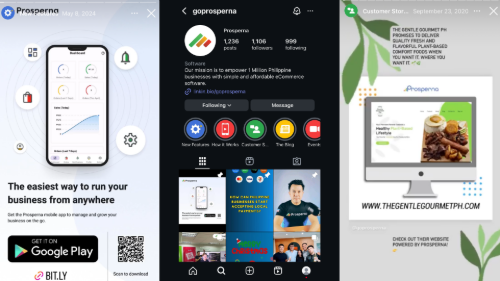
Maximizing business account features to improve your social media presence.
- Use your brand logo as your business account’s profile photo to make it easily identifiable for customers. The ideal image size is (320x320).
- Create a specific and unique bio describing your business. Write about your company’s services, include a concise mission statement, and promote your website in your bio.
- Include your company’s contact options. Include your business phone number, physical address, so submitting inquiries to your company is easy for customers.
- Use powerful action words in your posts and bio to entice users to purchase or interact with your business. Action words such as “Order now,” “Book,” “Reserve,” or “Get quote” are some effective examples.
- Create Instagram story highlights. Story highlights can be used to centralize useful buyer information for easy-access – such as FAQs, demonstrational videos, advice, and more. Highlights also add further visual appeal to your account.
Develop an effective Instagram Marketing plan.
Every social commerce platform is built differently. That is why business owners must create specific marketing plans catered to fit a platform’s designed algorithm, its typical users, and its purpose.
Instagram is a platform that relies on appealing visuals, with photos and/or videos accompanying all its content. Here are the aspects to consider when creating an effective Instagram Marketing plan:
- Define your target audience. Instagram is built on an algorithm that knows its users’ ages, preferences, and interests. Make sure you align your content to fit the image of your target audience, and gain more traction from that audience base.
- Set attainable goals and key performance indicators (KPIs), which are measurable values that exemplify a business’ success. KPIs to keep in mind are metrics such as sales revenue, customer satisfaction scores, website clicks, as well as story views and likes.
- Create a social media content calendar and schedule posts to build a consistent timeline and flow of content. When creating and planning out content, try to balance quantity and quality in your posts.
Connect with your audience.

As a platform designed for social activity, the degree to which people interact with certain Instagram posts dictates if it shows up on other users’ feeds.
Business owners must become a part of this constant conversation, and connect with your audience to attract a diverse set of users.
Establish rapport between other customers by responding to and liking comments. Repost customers who try out your business’ products to show genuine care for your audience base. Reply to inquiries on your Instagram account on a regular basis, and don’t shy away from asking for feedback. Utilize creative features on Instagram – such as polls, question boxes, or voting systems – to assess metrics on your business while making your page interactive.
Instagram Business Account FAQs
How do I switch my personal account into a business account?
- Open the app and click on your profile image in the lower right corner.
- Click on the hamburger menu in the top-right corner of your profile.
- Select ‘Settings’. Switch to Professional Account may be available from this menu in some accounts. In such a case, tap it. If not, proceed to the next step.
- Click on ‘Account’ and choose Business. Choose the business category that precisely describes your company.
- Review and update the contact details for your business as necessary. Follow the instructions to link your account to your Facebook Page if you want to link your Facebook business and Instagram accounts.
- Click ‘Done’ to finish creating your Instagram business profile.
How do I make my business stand out on Instagram?
You must put effort into ensuring your business profile has a professional and appealing visual aesthetic. Establish a theme for your Instagram page that matches your business’ vibe – and apply this theme to the rest of your content, including stories, posts, and reels.
In addition, diversify the type of content you release to keep users on their toes. Take advantage of the short-term timeframe of an Instagram story to promote special deals. Implement story highlights to emphasize product demos, influencer collaborations, or reviews.
How often should my business post on Instagram?
While businesses have independent potential to grow on Instagram, you must also acknowledge that hundreds of other businesses dominate the space, and are also looking to sell. A consistent posting schedule will help alleviate this issue.
It is recommended to release 3-5 feed posts per week and Instagram stories everyday. Businesses may also creatively make use of Instagram reels or IGTV uploads, which are valuable educational and promotional tools to boost visibility in the algorithm and show off your products for a longer span of time.
How does Prosperna help me sell on Instagram?
By using Prosperna when selling on Instagram you will improve your customer’s experience by offering faster, smoother and safer transactions. In addition, you will save a lot of time administrating orders, reconciling payments and managing shipping. For example, insert your Prosperna online store URL into your Instagram Bio Link and insert your specific product links to all of your posts inside your Instagram page so that customers will be prompted to checkout, pay and schedule shipping - done!
Final Thoughts
Platforms like Instagram don’t just serve as a social space – by implementing these Instagram business tips for Philippine SMEs, you can potentially unlock huge sales growth, an increase in customer satisfaction, and long term business exchanges.
Through creating a business account, companies can diversify their marketing techniques in different multimedia ways, including short-form and long-form content. It also acts as a center for convenient access to everything a buyer could need, may it be your business’ contact information, or virtual demonstrations of your product.
By creating an Instagram business account and leveraging all-in-one online store platforms like Prosperna, you don’t need to set up an Instagram Shop feature as a Philippine business.
Prosperna, Your Partner to eCommerce Success
Prosperna is an all-in-one AI-powered eCommerce platform for SMEs, entrepreneurs and digital creators. Our mission is to empower 1 million businesses with simple and affordable eCommerce software with the power of AI.
In fact, we are so passionate about helping small-to-medium sized businesses, entrepreneurs and content creators that we’re giving you a free account forever!
Want to create your online store?
Create your FREE-forever Prosperna account.
Comments
Loading comments...