

Facebook is designed to be easy-access for a range of audiences, from non-techy users, to avid shoppers. Its fully free online marketing channel, Facebook Marketplace, acts as a one-stop shop for a variety of goods – such as clothing items, furniture, food, and more.
The platform is even more appealing to Filipinos than citizens of any other country. With 90.8 million Filipinos on Facebook, the platform fosters the “always online” mentality in the country.
That is why less experienced sellers – especially Philippine SMEs – can look to Facebook Marketplace to reach an already online audience and get a headstart on growing their business’ digital visibility. Although it is daunting, it is also a staple platform where anyone, no matter what stage they’re at, can get started.
The problem is, there’s so many features on Facebook and they’re always changing.
That’s why we created this guide to help you with Facebook Marketplace selling tips for the Philippines.
How do I start selling on Facebook Marketplace?

- Set up Facebook Marketplace on your Desktop.
- Log in to your Facebook and click on “Marketplace” on the left sidebar.
- After clicking on the “Marketplace”, click the “Create New Listing” button on the left sidebar.
- Press “Item for Sale” in the four categories of “Choose Listing Type”.
- Click the “Add Photos” button and choose a good-quality photo of the product you want to sell.
- Add the necessary information about your product.
- Finally, press the “Publish” button to post your product listing.
- Set up Facebook Marketplace on your Mobile Device.
- Log in to your Facebook account, and click the “Marketplace” icon.
- Click “Sell”. You will see the four choices in “Create New Listing”. Click “Items”.
- Include all the information about your product, such as photos, title, price, category, condition, and description. And then be sure to edit your location.
- Once done, press “Publish” for posting.
What are the PROS of selling on Facebook Marketplace?
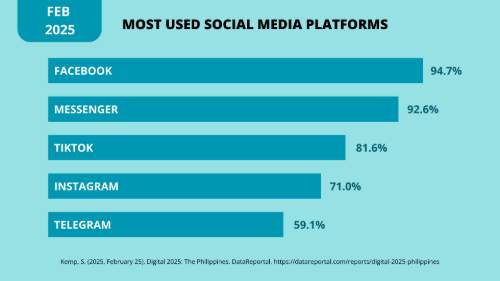
- Facebook gives you access to a limitless customer base – from parents seeking to purchase home goods on a budget, to high schoolers looking to buy trinkets. As one of the world’s largest networks, the best aspect is: Facebook sees user activity practically 24/7.
- 100% of your sale price is always 100% yours. There are no listing or final value fees on Facebook Marketplace.
- Facebook Marketplace is integrated with the app’s other features, including Facebook Messenger. This chatting feature ensures communications and sales are centralized to one platform – making it easier for you to navigate your products while staying in active touch with your customers.
What are the CONS of selling on Facebook Marketplace?
- While Facebook Marketplace promotes a free market, it also operates as an unregulated one. The platform is not fool proof against potential scammers, so individual sellers must be vigilant when doing business with customers in the marketplace.
- Facebook does not facilitate buyer protection, which some other platforms provide as a recourse if buyers and sellers engage in a dispute. It is fully up to individual sellers to ensure their transactions are smooth on both ends of the deal through communicating transparently and adopting fool-proof transaction processes.
- There are no integrated transaction and shipping features in Facebook Marketplace. This means that sellers must resort to external applications to manage payments and delivery of their products.
- Facebook Marketplace is so accessible that an overwhelming amount of sellers take up space on the platform. The competitive nature of the marketplace results in your listings not showing up in people’s algorithms sometimes.
What are the best practices of how to sell on the Facebook Marketplace in the Philippines?
Facebook Marketplace has a few cons; however, you can see more pros if you adopt these following best practices on the platform:
- Take high-quality and clear photos of your products. Online users are drawn to visually appealing and professional images. Your photos are the first things buyers see – and will be the aspect that makes a customer inclined to click on your listing.
- Write clear and concise listing descriptions. People are developing an increasingly short attention span due to high social media usage. Your customers must be able to understand what your product is from the get-go.
- Utilize relevant keywords and tags in your listings. The Facebook Marketplace algorithm is unpredictable and full of competing sellers. Ensure that your listing has a higher chance for visibility on the main page through adding specific tags related to the product – such as “keto,” “sugar-free,” or “low carb” when marketing keto-friendly food, for example.
- Proactively engage with potential buyers. Respond to inquiries quickly to ensure a swift and convenient checkout process with customers. This fosters trust and buyer confidence, which will make users more inclined to repeat business the next time.
- Keep your prices competitive. Chances are, other sellers have listings with prices ranges that are similar to yours. To ensure your product is the one users choose, keep your price realistic and balanced in comparison to other Facebook Marketplace listings of the same product and/or brand.
- Renew your listings to boost visibility. If a 7-day-old listing has yet to be sold, you can renew the stagnant listing. First, click “Your Account,” then go to “Your Listings” in the Marketplace dashboard. Then, find the listing and click the three-dot icon. Select “Renew Listing” from the options, and you’ve finished boosting its visibility on the site.
Facebook Marketplace FAQs
What kind of products are the best to sell on Facebook Marketplace in the Philippines?
Facebook Marketplace is often used as a space to sell both essentials, such as furniture, gadgets, home goods, as well as trending items, including beauty products, fashion, and clothing. There is also a mix of preloved and new items being sold on the platform.
When creating your listings, ensure you search up similar items to match its competitive price ranges.
How do I manage payments and deliveries if Facebook Marketplace doesn’t integrate it?
Use external payment and delivery tools in addition to Facebook Marketplace. For payment options, use applications such as GCash, Maya, Cash on Delivery (COD), bank transfers, and more. For delivery options, use services such as Lalamove, GrabExpress, J&T, LBC, and more.
How can I respond to inquiries quickly?
Make use of Facebook Marketplace integrated feature to maximize customer satisfaction. Set up automated replies, frequently asked questions, and greeting messages through your Facebook page.
Go to the left side-bar and click “Inbox” or “Professional Dashboard,” then click on “Automated Responses.” Here, you can set up instant replies, away messages, FAQs and auto-responses dependent on certain keywords. To incorporate an automated greeting, click on “Inbox,” then “Messaging Settings.” Turn it ON and click edit to type in a custom greeting for your business.
How does Prosperna help me sell on the Facebook Marketplace?
By using Prosperna when selling on the Facebook Marketplace you will improve your customer’s experience and build trust by offering faster, smoother and safer transactions. In addition, you will save a lot of time administrating orders, reconciling payments and managing shipping.
Here’s 4 specific examples:
- Insert your Prosperna online store link in your Facebook profile so that customers can verify you as a trusted online seller, browse your products, complete online checkout, submit payment and book shipping.
- Set up an “Order Now” call-to-action button on your Facebook page encouraging customers to browse your products, complete online checkout, submit payment and book shipping.
- Create FAQ buttons in your Facebook Messenger that automatically prompts customers to “View Catalog”, “See Promos”, “How to Order” and more which will redirect customers to your Prosperna online store enabling them to browse your products, complete online checkout, submit payment and book shipping.
- After your customer verbally confirms their ordering by chatting with you, all you have to do is share your Prosperna product link to your customers inside the Facebook Live chat so that they will be prompted to checkout, pay and schedule shipping - done!
Final Thoughts
Facebook Marketplace offers a giant potential customer base with ZERO fees for the platform, transactions, or listings, which means 100% of your sales are solely yours. For business owners looking for a simple yet effective platform, the marketplace ensures communication, description and listing features are centralized to one platform – which makes it easy to balance customer satisfaction, as well as the logistics of transactions.
While the potential to sell on Facebook is unlimited, execution is not easy.
By implementing these Facebook Marketplace selling tips for the Philippines and leveraging all-in-one online store platforms like Prosperna, you can dramatically increase your chances of success.
Prosperna, Your Partner to eCommerce Success
Prosperna is an all-in-one AI-powered eCommerce platform for SMEs, entrepreneurs and digital creators. Our mission is to empower 1 million businesses with simple and affordable eCommerce software with the power of AI.
In fact, we are so passionate about helping small-to-medium sized businesses, entrepreneurs and content creators that we’re giving you a free account forever!
Want to create your online store?
Create your FREE-forever Prosperna account.
Comments
Loading comments...